
Pick’em for Your Sleeper League: Matchups, Rules, and Setup
By Jordan Stirling · Updated
Run Pick’em over your Sleeper fantasy matchups with Armchair Commish. See the weekly board, learn how to join, and understand what the pool does.
Armchair Commish lets your league predict the winners of its own fantasy football matchups. Connect a Sleeper league, invite managers to Armchair Commish, and use Pick’em to choose a winner in each weekly head-to-head. Results come from the linked league, so the commissioner does not need to maintain a separate scoring spreadsheet.
Your fantasy league stays on Sleeper. Participants need an Armchair Commish account to submit picks; connecting a league does not automatically create accounts for its managers.
What are you picking?
You pick fantasy teams in your league, rather than NFL teams. If Field Generals faces End Zone Bandits this week, that is one of the matchups on your board. Picking Field Generals means predicting that its fantasy score will beat End Zone Bandits’ score.
A manager can lose their own fantasy matchup and still make successful Pick’em predictions. The two competitions have separate standings.
What does the weekly board show?
The board shows your league’s matchups, your selections, scores, and the league’s consensus. The matrix brings members’ picks together so you can see where the room agrees or splits. Check the lock information in the app before submitting or changing a pick.
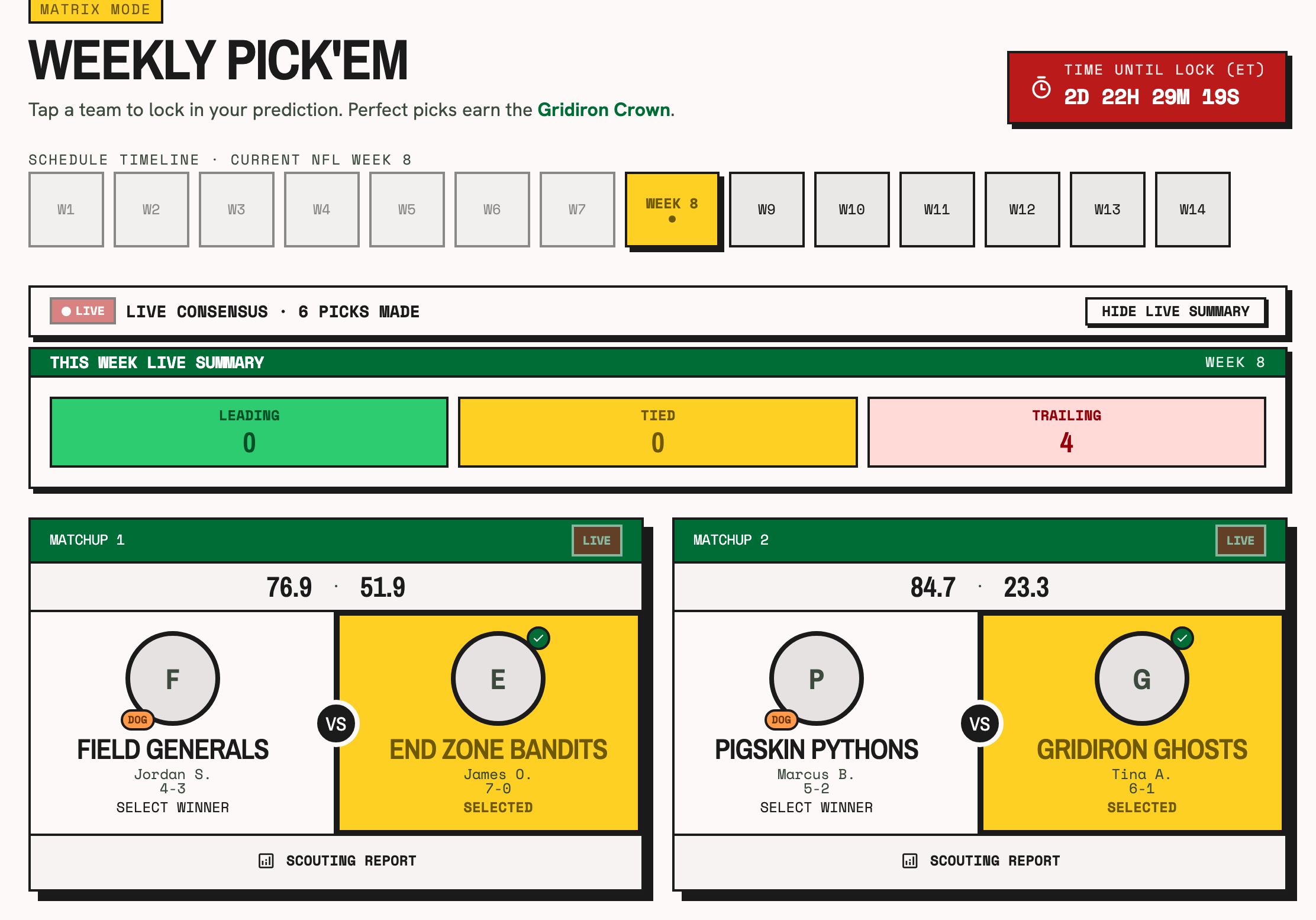
Explore the Pick’em demo without creating an account. It uses a sample league so you can inspect the experience before connecting your own.
How to set up Pick’em for a Sleeper league
- Create an Armchair Commish account. Sign in with email or Google.
- Connect your league. Enter your Sleeper username and choose the league you want to bring in. You do not provide a Sleeper password.
- Open Pick’em. Check the season’s settings, scoring rules, and weekly lock information before inviting participants.
- Invite your managers. Share the league invitation. Managers sign in to Armchair Commish and join the linked league to make their picks.
- Submit weekly predictions. Choose winners before the displayed locks. Review results and the Pick’em standings as league results are processed.
What does Armchair Commish automate?
Armchair Commish reads the linked league’s matchups and results and grades picks from those results. Your fantasy roster, trades, waivers, and starting lineup remain on Sleeper. Connecting the league is read-only; a Pick’em selection does not change a Sleeper lineup.
The pool does not collect entry fees or distribute prizes. Any optional side pot is managed separately by the commissioner and participants. You can also play entirely for bragging rights.
Pick’em or Survivor: which should your league choose?
Pick’em asks you to predict the weekly matchups and compete on a leaderboard. Survivor asks you to choose one fantasy team each week and stay within the pool’s allowed strikes. Pick’em suits managers who want to make several predictions; Survivor adds the planning challenge of saving teams for later when team reuse is disabled.
Both use the same league’s results. Read the Survivor setup guide to compare the rules.
Supported platforms and getting started
Sleeper league imports are supported. ESPN and Yahoo imports are not available. See the FAQ for current pricing and account details, or create an account to connect your league.